
Drop Watch: see what hits your next release
Tell Tactical when your next release goes live. From 15 minutes before it until the window closes, Tactical records what hits your store and what each visitor tried to do: people, AI agents, and requests where no browser ever ran the page. Afterwards you get a Drop Report: a page in your dashboard, a PDF you can forward, and the numbers as JSON. Nothing on your store is blocked or changed, and it's free.
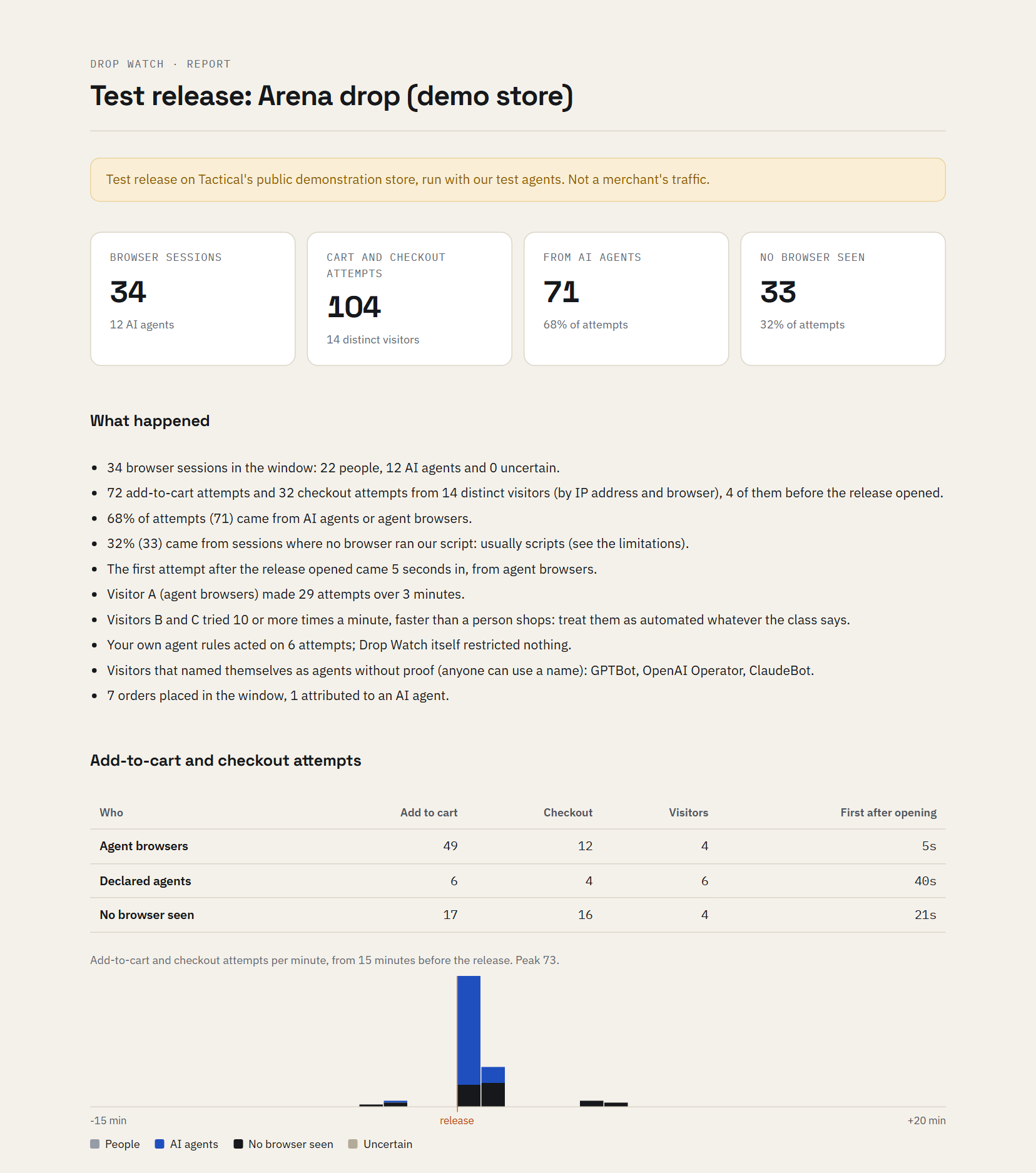
Download the sample report (PDF). It comes from a 20-minute test release on our own demonstration store, run with Tactical's test agents and a scripted cart bot. The store is public, so anyone else who visited in that window is counted too. It shows what a report looks like, not a merchant's traffic.
What the report shows
- Every add-to-cart and checkout attempt in the window, sorted by who made it: people, agent browsers, agents that name themselves, and requests where no browser ran Tactical's script, which is usually a script.
- A minute-by-minute timeline from 15 minutes before the release, so you can see who arrived first.
- Visitors that tried again and again, labelled A, B, C, with how many attempts and over how long.
- Agents by name, and whether each one proved who it is or only used the name.
- Orders placed in the window (WooCommerce).
- What it can't tell you, in plain words at the end of every report.
Why now
Since 28 September, AI agents in a shopper's browser can complete checkout on Shopify stores once the shopper confirms (Shopify's changelog). On 29 September OpenAI launched Dots, always-on agents that each run their own cloud browser (OpenAI). A limited release sells out in minutes, so it's where an automated buyer makes the biggest difference. A Drop Report shows you whether they're already there.
How it works
- Install the plugin. Tactical's WooCommerce plugin is free on WordPress.org. Sign up, paste your API key into the plugin, and it adds the storefront script for you.
- Add the release. In your dashboard, open Drop Watch and enter when the release goes live and when to stop watching, up to 48 hours. Set it at least 20 minutes ahead.
- Run your release as usual. During the window the plugin records every add-to-cart and checkout attempt, browser or not, and the script tells people from agents in the browser sessions. Nothing is blocked.
- Read the report. About 20 minutes after the window closes, it's in your dashboard as a page, a PDF and JSON.
Would you rather we set it up? Email [email protected] with your store and the release date.
Where it works
| Platform | What the report covers |
|---|---|
| WooCommerce | Everything above: every add-to-cart and checkout attempt, browser or not, plus browser sessions and orders. Plugin 1.5.0 or later; 1.4.0 works with the limits below. |
| Shopify | Browser sessions only: visitors whose browser runs the Tactical Detection app embed. Shopify doesn't show apps add-to-cart requests or checkout. |
| Other sites | Browser sessions from the storefront script. |
What it can't tell you
- Classes come from behaviour and declared identity: strong signals, not proof. An agent that behaves exactly like a person is counted as one.
- From plugin 1.5.0 an attempt is matched to its browser session by Tactical's session cookie. A request without it, from a script or a browser that blocks cookies or our script, is matched by IP address and browser instead, so a shopper whose requests left from different addresses can show as "no browser seen".
- On plugin versions before 1.5.0, the busiest seconds of a very large release can lose some attempts, so the counts are a floor.
During a window every add-to-cart and checkout attempt is recorded, people's included. Tactical's storefront script sets one first-party cookie holding a random session ID, and nothing else. The report holds counts and times only, with no IP address or user agent. See the privacy policy.